Basic Shell Scripting (Linux - part3)

I am a Linux system administrator with special interest on cloud and DevOps with 13+ years of experience on supporting large scale enterprise environment.
1) What is Kernel ?
In OS, a kernel is a computer program that serves as the core or central component of an operating system. It manages the system's resources, including the CPU, memory, and input/output devices, and provides a layer of abstraction between the hardware and the software.
The kernel is responsible for executing user programs and managing system processes. It also provides security features, such as memory protection, and handles device drivers, which are small programs that allow the operating system to communicate with hardware devices.
The kernel is loaded into memory when the computer starts up and remains in memory until the computer is shut down. Different operating systems have different kernel designs, and there are several types of kernels, including monolithic kernels, microkernels, and hybrid kernels.
The kernel is a computer program that is the core of a computer’s operating system, with complete control over everything in the system.
2) What is Shell ?
In Linux, the shell is a program that provides a command-line interface for interacting with the operating system. It is a user interface that allows users to enter commands, which are then interpreted and executed by the operating system. The shell is also responsible for managing the input and output of these commands, as well as handling errors and executing scripts.
There are several different shells available in Linux, including the Bourne-Again Shell (bash), the C Shell (csh), the Korn Shell (ksh), and the Z Shell (zsh). Bash is the most commonly used shell and is the default shell for many Linux distributions.
The shell provides a powerful and flexible way to interact with the operating system, and it allows users to automate repetitive tasks and perform complex operations quickly and easily. Shell scripting is a common way to automate tasks in Linux, and it involves writing scripts that can be executed by the shell to perform a series of commands and operations.
Bourne-Again Shell (bash) :- Bash, short for "Bourne-Again Shell," is a widely used shell for Linux and Unix-based operating systems. It is a command-line interface that allows users to interact with the operating system using text-based commands. Bash is a powerful and flexible shell that provides a wide range of features and functionality, including:
Command-line editing and history: Bash allows users to edit their command lines using key bindings and provides a history of previously executed commands.
Job control: Bash allows users to manage multiple processes or jobs and switch between them.
Variables and shell scripting: Bash allows users to create and manipulate variables and write scripts to automate tasks.
Input/output redirection: Bash allows users to redirect input and output streams to and from files, devices, and other programs.
Tab completion: Bash provides tab completion for commands, filenames, and directories, which can save time and reduce errors.
Bash is the default shell for many Linux distributions, and it is widely used by system administrators, developers, and power users. It is an open-source project and is continually developed and improved by a community of contributors.
the C Shell (csh) :- C Shell (csh) is a Unix shell that was developed by Bill Joy at the University of California, Berkeley in the late 1970s. It was designed to provide a more interactive and user-friendly shell than the original Bourne shell (sh) and was intended to be used as a replacement for it.
Csh has many features that make it popular among users, including command-line editing, job control, and support for aliases and variables. It also has a built-in scripting language that allows users to write shell scripts to automate tasks.
One of the main features of csh is its support for interactive use. It provides a number of shortcuts and commands that make it easier to navigate and manipulate the shell environment. For example, csh supports command-line editing using key bindings and provides a history of previously executed commands.
Despite its popularity, csh has some limitations and drawbacks. One of the main criticisms of csh is that its syntax and semantics are different from other shells, which can make it difficult to write portable scripts. Additionally, csh is not as efficient as other shells, such as bash, when it comes to executing commands and scripts. As a result, csh has largely been replaced by other shells in modern Unix and Linux systems.
the Korn Shell (ksh) :- The Korn shell (also known as "ksh") is a Unix shell that was developed by David Korn of Bell Labs in the 1980s. It is a powerful and flexible shell that is compatible with the POSIX standard for Unix shells.
In Linux, the Korn shell is often used as an interactive login shell, and also as a scripting language. It has many features that make it useful for scripting, such as command-line editing, command history, job control, and arithmetic expressions.
One of the major advantages of the Korn shell over other Unix shells is its compatibility with the Bourne shell, which is the default shell on many Unix systems. This means that shell scripts written for the Bourne shell can usually be run under the Korn shell without modification.
Overall, the Korn shell is a powerful and versatile shell that is well-suited for both interactive use and scripting on Linux and other Unix-like systems.
the Z Shell (zsh) :- Zsh is a Unix shell that is designed to be an interactive login shell and a powerful scripting language. It was developed by Paul Falstad in 1990 and is now maintained by a group of developers as an open-source project.
Zsh offers many features not found in other shells, such as advanced tab completion, spelling correction, and path expansion. It also includes many features of other shells, such as command history, job control, and shell scripting.
One of the unique features of Zsh is its "oh-my-zsh" framework, which provides a plugin architecture and a collection of useful plugins and themes for customizing the shell's appearance and behavior. This makes it a popular choice for power users and developers who want to customize their shell environment.
Zsh is included in many Linux distributions and is often used as the default shell on macOS. It is compatible with most Bourne-style shell scripts, so scripts written for Bash or other shells can usually be run under Zsh without modification.
Overall, Zsh is a powerful and customizable Unix shell that offers many advanced features for both interactive use and shell scripting.
3) What is Linux Shell Scripting?
Linux shell scripting is the process of creating scripts or programs written in a shell language to automate tasks in a Linux or Unix environment. The shell is a command-line interface that allows users to interact with the operating system and execute commands.
Shell scripts are typically written in a language such as Bash, Zsh, or Ksh, and are used to perform a variety of tasks, including system administration, file management, and automation of repetitive tasks.
Some common uses of shell scripts include automating backups, scheduling tasks, managing user accounts, and deploying software updates. Shell scripts can also be used to create complex workflows by combining various commands and tools into a single script.
One of the key benefits of Linux shell scripting is that it allows users to automate tasks that would otherwise be time-consuming or error-prone. By writing a script to perform a task, the user can save time, reduce the risk of errors, and increase efficiency.
Overall, Linux shell scripting is an essential skill for Linux and Unix system administrators, developers, and power users. With a basic knowledge of shell scripting, users can create powerful scripts and automate complex tasks in a Linux environment.
4) why Shell Scripting is important for DevOps ?
Shell scripting is an essential skill for DevOps professionals, as it provides a powerful and flexible way to automate various tasks in the development and deployment process. Here are some of the reasons why shell scripting is important in DevOps:
Automation: DevOps emphasizes automation to streamline and accelerate the development and deployment process. Shell scripting is an important tool for automating repetitive and time-consuming tasks, such as building and deploying applications, configuring servers, and monitoring systems.
Standardization: In a DevOps environment, it is important to have consistent and standardized processes for deploying and managing applications. Shell scripting provides a way to create repeatable and consistent processes that can be easily shared and reused across teams.
Customization: Every organization has unique requirements and workflows. Shell scripting provides a flexible and customizable way to tailor the development and deployment process to the specific needs of the organization.
Integration: DevOps requires the integration of various tools and technologies, such as continuous integration and continuous deployment (CI/CD) pipelines, monitoring and alerting tools, and configuration management tools. Shell scripting provides a way to integrate these tools and automate the workflow between them.
Scalability: DevOps environments often involve managing large-scale infrastructure and complex systems. Shell scripting provides a scalable way to manage these systems by automating tasks and reducing the risk of errors.
Overall, shell scripting is an essential skill for DevOps professionals, as it enables them to automate, standardize, customize, integrate, and scale the development and deployment process.
5) What is #!/bin/bash? can we write #!/bin/sh as well?
Shell script to specify the interpreter that should be used to execute the script. In this case, it specifies that the Bash shell (/bin/bash) should be used to interpret the commands in the script.
When a shell script is executed, the kernel reads the shebang line and uses the specified interpreter to execute the script. This allows users to create shell scripts in any shell language, such as Bash, Zsh, or Ksh and ensures that the correct interpreter is used to execute the script.
The shebang line is not limited to shell scripts, it can also be used in other types of scripts or programs to specify the interpreter that should be used to execute them. For example, "#!/usr/bin/python" is used to specify that a Python interpreter should be used to execute a Python script.
Overall, the shebang line is an important aspect of shell scripting and allows users to specify the interpreter that should be used to execute a script, ensuring that the script is executed correctly and efficiently.
So, we can't use #!/bin/sh as a shebang line to start the shell script.
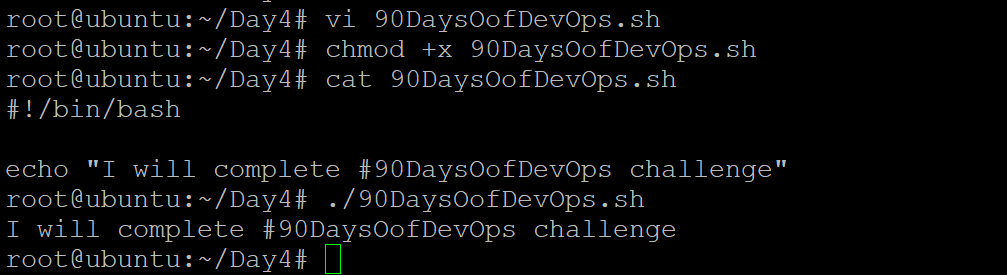
6) Write a Shell Script that prints I will complete #90DaysOofDevOps challenge.
To create and execute this script:- vi 90DaysOofDevOps.sh
Open the terminal and navigate to the directory where the file is saved.
Make the file executable by running the command chmod +x 90DaysOofDevOps.sh.
Finally, run the script by entering ./90DaysOofDevOps.sh in the terminal.
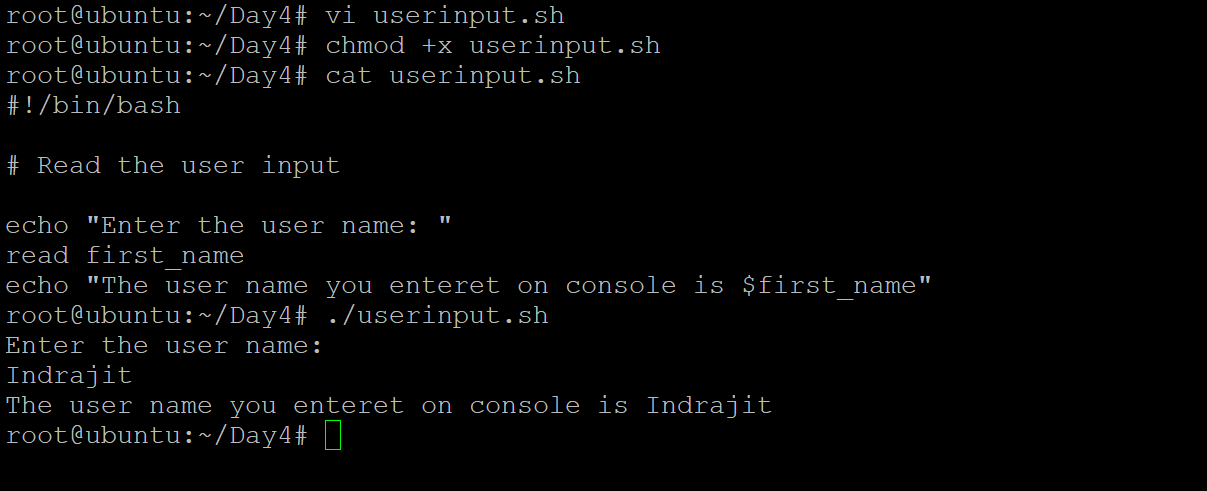
7) Write a Shell Script to take user input, input from arguments and print the variables
8) Write an Example of If else in Shell Scripting by comparing 2 numbers
The shell script for this :-
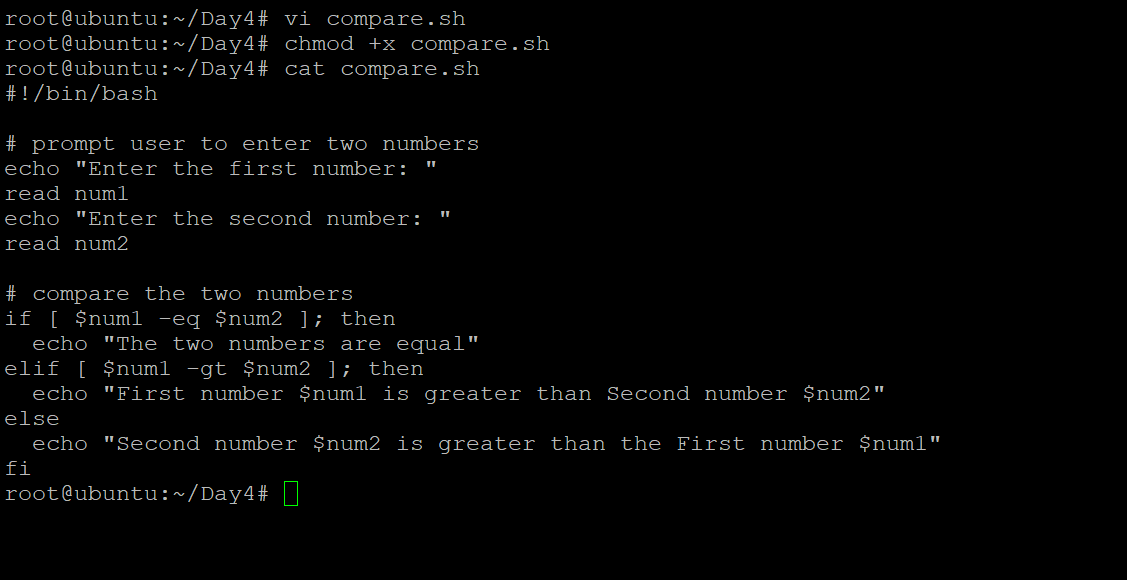
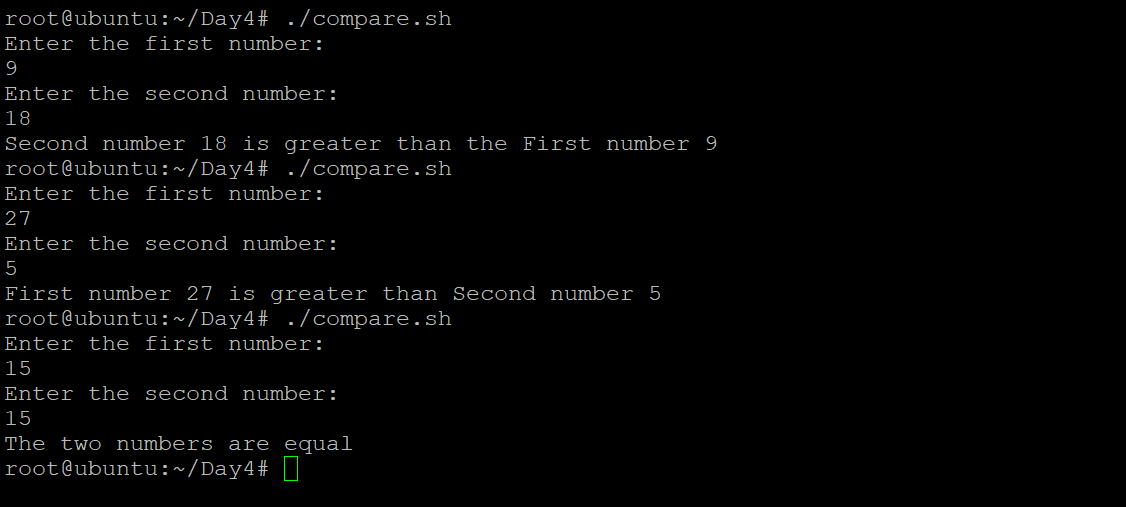
Out of this shell script when you will run is as ./compare.sh
We will learn more advance shell script on our next blog

