Basic Git & GitHub for DevOps Engineers

I am a Linux system administrator with special interest on cloud and DevOps with 13+ years of experience on supporting large scale enterprise environment.
1) What is Git?
Git is a distributed version control system used to manage source code and track changes made to files over time. It was created by Linus Torvalds in 2005 and is now widely used by developers around the world.
Git allows multiple users to work on the same codebase simultaneously, making it easier to collaborate on software development projects. It tracks changes made to files, allowing developers to revert to previous versions if necessary. Git also allows for branching, which lets developers work on different versions of the same codebase simultaneously and merge changes back together later.
Git is commonly used with remote repositories hosted on services such as GitHub, GitLab, and Bitbucket, allowing developers to easily share and collaborate on code with others. Additionally, Git can be used locally on a developer's machine, making it easy to track changes to code without the need for an internet connection.
2) What is Github?
GitHub is a web-based platform that provides hosting for software development projects using the Git version control system. It was created in 2008 and has since become one of the most popular platforms for developers to share and collaborate on code.
GitHub allows developers to create repositories, which are containers for projects that can contain source code, documentation, and other files. Repositories can be made public or private, and users can collaborate on projects by making changes to the code and submitting pull requests to merge those changes back into the main branch.
GitHub also offers a range of features to support software development, including issue tracking, project management tools, and continuous integration and deployment capabilities. It integrates with a variety of other tools and services, such as Slack, Jira, and CircleCI, to streamline the development workflow.
GitHub has become a central hub for open-source software development, with millions of repositories and contributors from around the world. It is also used by companies to host private repositories for internal software development projects.
3) What is Version Control?
Version control is the management of changes made to a file, document, or codebase over time. It involves keeping track of changes to a file or set of files, allowing multiple users to work on the same codebase, and keeping a history of changes that can be rolled back if necessary.
Version control is particularly important for software development, where changes to code can have a significant impact on the behavior of a program. Version control systems such as Git allow developers to track changes to code, create branches to work on different versions of the same codebase, and merge changes back together when they are ready.
Version control also provides a way to collaborate on code, with multiple users able to work on the same project simultaneously. Changes made by different users can be tracked, reviewed, and merged together, allowing teams to work more efficiently and reduce the risk of conflicts or errors.
Version control systems are also used to maintain a history of changes, allowing developers to roll back to a previous version of code if necessary. This can be useful for debugging, testing, and ensuring the stability of a codebase over time.
4) How many types of version controls we have?
There are two main types of version control: centralized version control and distributed version control.
Centralized version control involves a central repository that stores the codebase, with multiple users able to access and make changes to the codebase. Changes are made on individual machines and then submitted to the central repository. Examples of centralized version control systems include Subversion (SVN) and Microsoft's Team Foundation Server (TFS).
Distributed version control, on the other hand, does not have a central repository. Instead, each user has a local repository on their machine that contains the full history of the codebase. Changes can be made locally and then pushed to other repositories, allowing for greater flexibility and offline development. Git and Mercurial are examples of distributed version control systems.
Both centralized and distributed version control systems have their advantages and disadvantages, and the choice of system will depend on the specific needs of the development team.
5) Why we use distributed version control over centralized version control?
Distributed version control systems (DVCS), such as Git, have become increasingly popular over the years because they offer several advantages over centralized version control systems (CVCS), such as Subversion (SVN).
One of the main advantages of DVCS is that each user has a local copy of the entire repository on their machine. This means that developers can work on the codebase without a network connection, and they have full access to the history of changes. This makes it easier to work in remote or offline environments, which is particularly useful for open-source projects with contributors from around the world.
Another advantage of DVCS is that it allows for greater flexibility in branching and merging. With a CVCS, changes must be made to a central repository, which can create conflicts and make it difficult to work on different versions of the codebase simultaneously. With DVCS, developers can create local branches and work on separate versions of the codebase without interfering with each other. This makes it easier to experiment with new features, test changes, and collaborate on code with other developers.
DVCS also provides a more granular level of control over the repository, allowing developers to selectively choose which changes to incorporate into the main branch. This can help ensure that only high-quality code is merged into the main branch, which is essential for maintaining code quality and stability over time.
Overall, DVCS provides greater flexibility, better offline support, and more granular control over the codebase, making it a popular choice for many developers and organizations.
6) Why Git is important?
Git is an important tool for software development for several reasons:
Version control: Git is a powerful version control system that allows developers to track changes to code over time, merge changes from multiple contributors, and roll back to previous versions if necessary. This is essential for maintaining code quality and stability over time, particularly in large-scale software development projects.
Collaboration: Git makes it easy for developers to collaborate on code, with multiple contributors able to work on the same codebase simultaneously. Git allows developers to work on separate branches and merge changes together when they are ready, reducing the risk of conflicts or errors.
Flexibility: Git is a distributed version control system, which means that each user has a local copy of the entire repository on their machine. This provides greater flexibility, allowing developers to work in remote or offline environments and experiment with new features or changes without interfering with the main codebase.
Integration: Git integrates with a wide range of tools and services, including project management tools, continuous integration and deployment systems, and code review platforms. This makes it easy to incorporate Git into existing development workflows and collaborate with other developers and teams.
Open-source community: Git is used by a large and active open-source community, which means that there is a wealth of resources, documentation, and support available for developers. This can help new developers get up to speed quickly and contribute to open-source projects more easily.
Overall, Git has become an essential tool for software development, providing developers with powerful version control, collaboration, flexibility, integration, and support.
7) What is difference Between Main Branch and Master Branch in git?
In Git, the terms "main" and "master" are used to refer to the default branch of a repository. Historically, the term "master" was used to refer to the default branch, but in recent years, many people have started using "main" instead, to avoid any potentially offensive connotations associated with the term "master".
The main difference between the "main" branch and the "master" branch is simply the name. They both function in the same way as the default branch of a Git repository, with any changes made to the codebase being tracked on that branch. Both branches can be renamed to any other name, as Git allows for flexible branch naming conventions.
However, it is worth noting that many software development communities are moving away from the use of the term "master" to avoid any potential negative connotations. As a result, it is becoming increasingly common to see the term "main" used instead.
In summary, the "main" and "master" branches in Git both function as the default branch of a repository, and the main difference is simply the name used to refer to them.
8) Can you explain the difference between Git and GitHub?
Git and GitHub are related, but they serve different purposes and have different functionalities. Here are some differences:
Git:
Git is a version control system that allows you to manage changes to your code or any other type of files.
It is a command-line tool that runs locally on your computer.
Git tracks changes to files and stores those changes in a repository.
You can use Git to work on your own code or collaborate with others.
GitHub:
GitHub is a web-based hosting service for Git repositories.
It provides a graphical interface for managing Git repositories, as well as a set of collaboration tools, like pull requests, issues, and wikis.
You can use GitHub to store your Git repositories online, share your code with others, and collaborate with others on projects.
GitHub also provides a social network aspect, where developers can follow each other, contribute to open-source projects, and showcase their work.
In short, Git is a version control system, and GitHub is a web-based hosting service for Git repositories that provides a set of collaboration tools.
9) How do you create a new repository on GitHub?
To create a new repository on GitHub, follow these steps:
Go to the GitHub homepage and log in to your account.
Click on the "+" icon in the top right corner of the page.
Select "New repository" from the dropdown menu.
Choose a name for your repository and add a description (optional).
Select whether you want your repository to be public or private.
Initialize the repository with a README file (optional).
Choose a license for your repository (optional).
Click on the "Create repository" button.
New repository is now ready and we can start adding files to it.
10) What is difference between local & remote repository?
A local repository is a copy of a repository that is stored on your local machine, while a remote repository is a repository that is stored on a remote server, such as GitHub. Here are some of the key differences between local and remote repositories:
Location: The main difference between local and remote repositories is their location. Local repositories are stored on your local machine, while remote repositories are stored on a remote server.
Access: Local repositories can only be accessed from the machine they are stored on, while remote repositories can be accessed from any machine with internet access.
Collaboration: Remote repositories are often used for collaborative projects because they can be accessed by multiple users. Local repositories, on the other hand, are typically used for individual projects.
Backup: Remote repositories provide a backup of your code, which can be useful in case your local repository is lost or damaged.
Synchronization: In order to keep your local and remote repositories in sync, you need to use a version control system like Git. Git allows you to push changes from your local repository to a remote repository and pull changes from a remote repository to your local repository.
Overall, local and remote repositories serve different purposes. Local repositories are useful for individual projects or for making changes offline, while remote repositories are useful for collaborative projects and for backing up your code.
11) How to connect local repository to remote repository?
To connect our local repository to a remote repository on GitHub, we can follow these steps:
Create a new repository on GitHub
Copy the HTTPS URL of the remote repository from the GitHub website.
Open our local repository in a terminal window and use the "git remote add" command to add the remote repository URL as a new remote:
git remote add origin
- Use the "git remote -v" command to verify that the new remote has been added:
git remote -v
This should show the URL of our remote repository.
- Push our local repository to the remote repository using the "git push" command:
git push -u origin main
This will push the current branch to the "main" branch on the remote repository. If we have a different branch name, then need to replace "main" with the name of our branch.
After following these steps, our local repository will be connected to the remote repository on GitHub. Now we can use Git commands to push and pull changes between our local and remote repositories.
12) Git workflow diagram :-
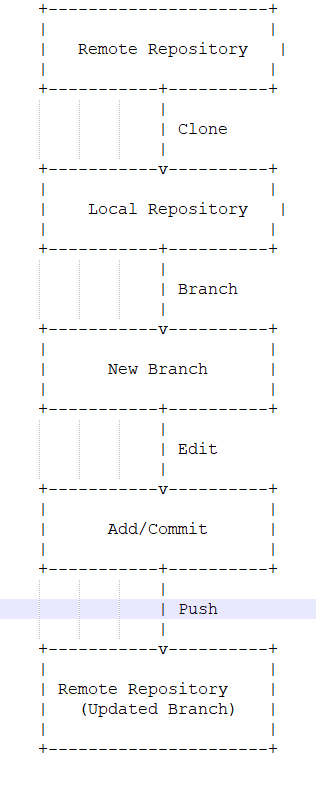
In this diagram:
The Remote Repository is the repository that is hosted on a remote server, such as GitHub or GitLab.
The Local Repository is a copy of the remote repository that is stored on your local machine.
Clone refers to the process of creating a local copy of the remote repository on your machine.
Branching allows you to create a new branch in your local repository that can be used to develop new features or make changes without affecting the main codebase.
Editing involves making changes to files in your local repository.
Adding and committing changes captures the changes you have made to files in your local repository and prepares them to be pushed to the remote repository.
Pushing involves sending the committed changes to the remote repository.

